
Forking VS Code gets you to market fast. Building on a platform gets you a product that lasts. Eclipse Theia is that platform.
Over the last two years, a wave of "AI native editors" has launched on top of a fork of Microsoft's Visual Studio Code (VS Code). Cursor says it's "built on VS Code", Windsurf markets VS Code compatibility, and similar tools follow the same path. Cursor: https://www.cursor.com Windsurf Editor (Codeium): https://windsurf.com
On the surface this makes sense: you inherit a familiar UX and a huge extension ecosystem, and you can patch whatever the public extension API will not let you do. But forks come with hidden costs: ongoing rebasing, licensing puzzles, marketplace restrictions, and dependence on Microsoft's governance.
Recent events have made this more concrete. In 2025, Microsoft extensions like the C and C++ tooling stopped working in Cursor and other forks, due to licensing and distribution enforcement. This is a good illustration of ecosystem risk when your product depends on a competitor controlled store.
In this article, we look at why well known products felt the need to go beyond the VS Code extension API, and why a platform approach is a better long term bet.
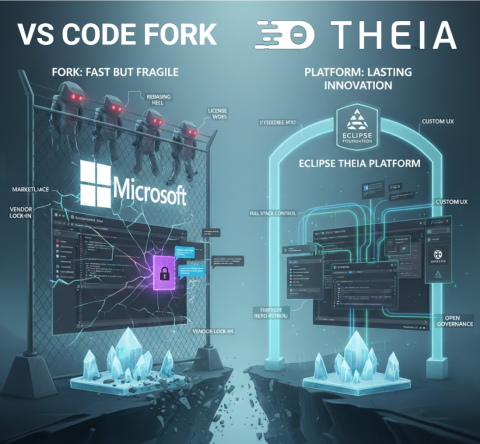
🔧 Extensible product vs platform to build a product
This conceptual distinction is crucial and often overlooked:
- VS Code is an extensible product. It was designed as a developer tool first, with a stable API for third party extensions. That API is intentionally limited: it protects end users, keeps the UX coherent, and ensures Microsoft can evolve the product safely. But it was never designed as the foundation for other products.
- A platform, by contrast, is designed for others to build on. It exposes deep, stable extension points across both frontend and backend, allows reshaping of the UX, and gives you governance over distribution and policy. A platform invites you to innovate, while an extensible product restricts you to safe, controlled add ons.
If you treat an extensible product like VS Code as if it were a platform, you hit walls quickly. Branding, reshaping the UX, embedding AI into every pane, or orchestrating application wide experiences push you beyond what the extension surface can do. That's why so many teams end up considering a fork.
And this brings us to the following practical question:
⚠️ "Why not just use the extension API?", where it runs out of road
Yes, you can ship impressive AI features as plain VS Code extensions today. The Marketplace has a long tail of AI tools. For example:
- GitHub Copilot: https://marketplace.visualstudio.com/items?itemName=GitHub.copilot
- Codeium: https://marketplace.visualstudio.com/items?itemName=Codeium.codeium
- Tabnine: https://marketplace.visualstudio.com/items?itemName=TabNine.tabnine-vscode
- Sourcegraph Cody: https://marketplace.visualstudio.com/items?itemName=sourcegraph.cody-ai
- Continue: https://marketplace.visualstudio.com/items?itemName=Continue.continue
So why do Cursor, Windsurf, and other "AI native editors" still fork instead of "just using the API"? Because the differentiators they want, AI woven into every pane, proactive behaviour driven by global context, and ownership over distribution and governance, live beyond what the extension surface is designed to allow.
VS Code's extension API is deliberately stable and constrained. That's good for end users, it is limiting for teams trying to build product level experiences. Conceptually, adding a menu, command, or extra view is squarely in extension territory, but branding, reshaping the UX, or deeply weaving AI into the core experience quickly pushes you outside those safe boundaries. The examples below illustrate where this line gets crossed in practice.
Full stack control matters Building a compelling AI native product is not just about what happens in the editor. You need full stack control: how do you host the system? how do you integrate it with LLMs, web UIs, version control backends, custom deployment pipelines, or proprietary data sources? An extension runs in someone else's sandbox. A platform lets you own the entire stack, from backend services to frontend UX, and wire them together however your product demands.
The Copilot advantage, governance over the API surface You might wonder why GitHub Copilot seems so well integrated in VS Code. The reason is simple: Microsoft opened explicit internal and provisional APIs for this extension over time. They could do this because they have the sources of VS Code under their control. Other vendors do not have this type of governance advantage. If you're building a competing AI tool, you're stuck with the public, stable API, while your competitor gets to shape the platform to fit their needs.
A few examples that frequently push teams to fork:
1) Custom chat UX, often the heart of AI native products Chat is frequently the primary interface for AI native editors, yet VS Code's chat API is only partially extensible. You can contribute chat participants and commands, but you cannot tailor the chat panel's layout, styling, or interaction patterns to match your product vision. Almost all forks, and even many VS Code extensions, build their own custom chat windows as a result. For extensions, these separate chat implementations often lack full integration with the rest of the workbench, creating a disjointed experience. For forks, custom chat becomes possible but adds to the maintenance burden. If chat is central to your product's identity, the built in chat surface won't let you differentiate.
2) True overlay or embedded AI in any view (Explorer, Terminal, Debug, Problems) Extensions can add views and webviews, decorate text, and place context menu entries, but cannot freely render overlays into Microsoft's built in views. Even seemingly simple tasks, like reacting to hover or selection in the built in File Explorer, lack public events. The UX guidelines nudge you to context menus or new panels, not invasive overlays. If your product vision needs first class, in place AI everywhere, you hit walls quickly.
3) Observability of user activity across the workbench You can observe text document edits and active editor changes. But there is no comprehensive, supported activity stream API for everything a user does across built in views, and the few window level signals that exist are limited and have rough edges. For proactive AI that reacts to what just happened anywhere, you'll end up resorting to fragile workarounds, or a fork.
4) Terminal output and non editor context Terminal APIs have historically required proposed or limited contracts. Reading raw output reliably from all terminals is not a stable, generally available capability for Marketplace extensions. That makes terminal aware copilots harder to ship purely as a VS Code extension.
5) Global editor state and multi editor context You can inspect the active editor and the set of visible editors, but a complete inventory of open editors and their state is not cleanly exposed as a first class, stable API. The long trail of issues and discussions around open editors illustrates how tricky this is for extension authors who need holistic context.
6) Full control over debug sessions You can start sessions and send Debug Adapter Protocol requests via DebugSession customRequest, and many scenarios work. But building a product that orchestrates multi session debugging, steps intelligently, and cross links with other views means living with adapter differences, fragile command execution, and no guarantees for non standard actions. That's fine for an extension. It is a risky foundation for a product's core UX.
7) Competing with, or coordinating, other extensions VS Code now has inline completions and AI chat APIs, but precedence and interaction between providers isn't something extensions can reliably control. Co existence works in many cases, but you can't build a product that depends on always winning over someone else's extension.
And when you outgrow the API, you're tempted to fork. That's exactly the trap!
🪤 The fork trap in practice
Forks give you immediate superpowers: patch any internal, add new IPC, rewire the shell. But every VS Code monthly release brings integration work. You either lag behind upstream, users notice, or you staff an ongoing rebasing team, expensive. Meanwhile, you cannot rely on Microsoft's marketplace or proprietary extensions to fill gaps. Microsoft has also removed or restricted direct VSIX downloads in the Marketplace over time, making offline or alternative distribution harder for non official editors.
We've written about this at length: forking looks fast now, but you pay it back with interest. The costs include maintenance, ecosystem access, legal licensing, and governance risk vis a vis a direct competitor with Copilot strategically integrated into VS Code.
🌍 Eclipse Theia: a platform for custom IDEs and AI tools
Eclipse Theia was built to let you create products, not just extensions. If your starting point is something very close to VS Code, you can get there: Eclipse Theia runs VS Code extensions, uses the same Monaco editor, and supports familiar UX patterns out of the box. But unlike a fork, you aren't stuck inside someone else's product boundaries. From that familiar baseline, you can go further, reshaping the UX, embedding AI deeply, and owning the governance.
Here is what that means in practice:
- Design your own UX and shell Eclipse Theia's open extension points, frontend and backend, let you compose and replace UI parts. You can embed AI assistants directly in non editor views, Terminal, Explorer, Debug, custom panels, or build proactive AI that observes lifecycle and UI events across the whole application, something extensions in VS Code can't reliably do.
- Fully customise your AI chat experience Unlike VS Code's constrained chat API, Eclipse Theia lets you fully customise the chat view, add custom commands, integrate suggested questions, and design workflows tailored to your users' needs. Whether you want a branded chat interface, domain specific interaction patterns, or seamless integration with the rest of your workbench, you have complete control.
- Holistic context collection In Eclipse Theia, you can track multiple editors, recent edits, active tasks, terminal state, debug state, and domain specific artefacts in a single coherent context model. This enables AI that reacts to the full workbench, not just partial signals.
- Own your AI strategy With Theia AI, you get a framework for LLMs, prompt management, tools agents, and context plumbing. You can integrate AI into commands, code actions, terminal flows, or custom widgets on your terms. You choose the models, cloud, on prem, or local, the data boundaries, and the UX.
- Full stack extensibility and governance Eclipse Theia runs VS Code extensions and integrates with Open VSX for distribution, but you can also curate your own registry and policies. You define your update cadence, telemetry policy, and model endpoints, free from single vendor control. Open VSX Registry: https://open-vsx.org
- Proof in production Arduino IDE 2.0 is one example of a deeply customised Eclipse Theia based product, not a VS Code fork, used by millions of developers worldwide. For a broader overview, see the active ecosystem of Eclipse Theia adopters: https://www.eclipse.org/topics/ide/articles/the-active-ecosystem-of-eclipse-theia-adopters/
In short: the feature classes that routinely force teams to fork VS Code, proactive AI, AI embedded everywhere, holistic context, and governance control, are first class capabilities in Eclipse Theia.
🏛️ Why it matters that this lives at the Eclipse Foundation
This is not just a technical choice. It is also about governance.
Eclipse Theia and Open VSX are hosted by the Eclipse Foundation, which means vendor neutral governance, transparent IP management, and community driven roadmaps. For adopters, that reduces the risk of policy shifts by a single commercial actor, especially when you are building a product that might compete with capabilities bundled into VS Code itself. The ecosystem benefits from shared maintenance, shared innovation, and a predictable governance model. Open VSX is an Eclipse open source project operated by the Eclipse Foundation: https://open-vsx.org
Practically, this lets companies invest in differentiation rather than continuously rebasing a fork, while still staying close to the VS Code user experience when that is valuable.
🔒 Governance matters, especially when your competitor runs the store
If your product competes with Copilot or with VS Code itself, you're essentially forking a competitor's flagship and hoping their policies won't shift under you. We've argued before that open is not open enough when governance and distribution are controlled by a single vendor. The Eclipse community's answer is open tech and open governance.
With Eclipse Theia, you're not alone. You become part of an active ecosystem where multiple adopters share common maintenance costs and collectively benefit from platform innovations. Generic improvements, new IDE features, AI framework enhancements, security updates, are developed once and shared across the entire community. You invest in differentiation, not in reinventing the wheel or constantly rebasing a fork.
📚 Further reading
- Is it a good idea to fork VS Code? https://eclipsesource.com/blogs/2024/12/17/is-it-a-good-idea-to-fork-vs-code/
- Why extending GitHub Copilot in VS Code may not be the best fit for your AI native tool https://blogs.eclipse.org/post/thomas-froment/why-extending-github-copilot-vs-code-may-not-be-best-fit-your-ai-native
- When "open" isn't open enough, rethinking trust in dev tools https://blogs.eclipse.org/post/thomas-froment/when-%E2%80%9Copen%E2%80%9D-isn%E2%80%99t-open-enough-rethinking-trust-dev-tools
- Can't download VSIX in VS Code? Use Open VSX https://blogs.eclipse.org/post/thomas-froment/cant-download-vsix-vs-code-use-openvsx
✨ One last thought
Cursor, Windsurf, and others have shown what AI can feel like in an editor. The next winners will show what AI can feel like in a seamless product. If that's your goal, don't start by forking your competitor's product. Start on a platform designed for you.
Theia platform: start here https://theia-ide.org/theia-platform/


