
Today, I am pleased to present an article from Andy Baldrian, a PhD researcher at the University of Bristol's Cyber Security Group. Andy specialises in developer-centered security, focusing on secure, privacy-preserving IoT solutions.
His article focuses on secure boot, the critical feature that guarantees your IoT device is running the correct, trusted software intended by the manufacturer. Andy details the complexities of its implementation, key management, and the challenges developers face in configuring this critical layer.
Andy's team from the University of Bristol Cyber Security Group are conducting research to understand how developers incorporate and implement secure boot in IoT devices. Your input will help improve best practices and tools for creating more secure IoT solutions. If you are a developer who works with secure boot, please take a moment to complete the survey.
There’s a snake in my secure boot!
Is your smart doorbell monitoring you? Can someone use your smart speaker to listen to your conversations? Do you know that your smart devices are running the software that the manufacturer intended? This last question is a fundamental security question. The answer is secure boot, this feature guarantees that your IoT device is running the correct, trusted software. But can developers implement secure boot correctly, and are there ways that we can improve the process?
The Internet of Things
The term "Internet of Things" was first coined by Kevin Ashton in 1999 "as the title of a presentation", it defines a connected device that interacts with the world around it. "We need to empower computers with their own means of gathering information, so they can see, hear and smell the world for themselves, in all its random glory”. These devices now touch many parts of our lives, monitoring traffic in our cities, watching who is at the front door, tracking how much exercise we are doing, and even knowing what is in the fridge. They collect vast amounts of data, much of which is sensitive and personal. IoT devices also have a reputation for being insecure. They have been used as part of a criminal botnet, to break into a casino database and to watch people in their own homes. Industry has responded by providing several best practice guidelines and security frameworks. These recommendations are aimed at IoT device manufacturers and developers to help them build more secure IoT devices. In turn, governments around the world have introduced regulations to encourage manufacturers to build more secure IoT devices.
Booting an IoT device
Booting the device, initialises the hardware and loads the application software. There is a bit of a chicken and egg situation. To load the application software, the device needs a program that can load the software. But to do this, the device needs a program that can load the program that will load the application software...
This program is called the bootloader, and it is often done in two stages. The first stage bootloader will initialise the minimum amount of hardware needed to read and load the second stage bootloader. The first stage bootloader is simple and designed for the hardware of the specific IoT device. The second stage bootloader is a more generic and complex software that may have additional features. The second stage bootloader will load the user application or operating system, finally handing over control of the device to the application, see Figure 1. For the user to be certain that the right software is running, the device needs to be able to validate that, at each stage, the correct software was loaded. This is secure boot.
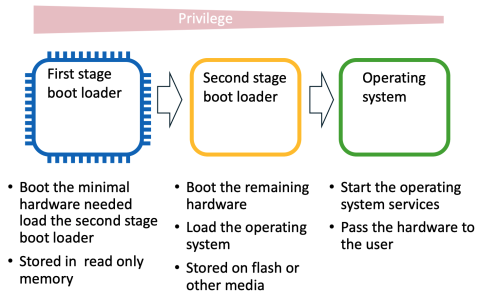
Figure 1: Example of two-stage bootloader
Root of Trust
We need to start by trusting “something”, in an IoT device this something is the Root of Trust (RoT). The Root of Trust is the start of an authenticated chain of execution, often implemented within secure hardware such as a Trusted Execution Environment (TEE) e.g. Arm’s TrustZone. The TEE provides a set of security primitives such as signature validation and key storage. The hardware is often tamper-resistant and has protection from side channel attacks. The secure hardware works in partnership with the secure boot process to provide the Root of Trust.
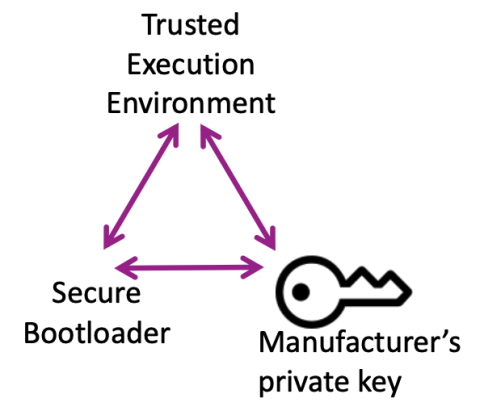
The Root of Trust is the source of all the security guarantees that are provided by the IoT device, for example the device identity. There must be an unbroken chain from the Root of Trust to these security guarantees. For the device identity to be trusted it must be protected by the Root of Trust.
Secure boot
Secure boot is the act of validating each software image before handing over control to the next stage. The software for the first stage bootloader is loaded from immutable memory such as Read Only Memory (ROM) or some other protected memory. The first stage bootloader cannot be easily updated. Its job is simple, validate the second stage bootloader and if valid, pass control to the second stage bootloader. The Secure boot process:
1. The software image of the second stage bootloader is signed using the IoT device manufacturers’ private boot key.
2. The IoT device stores the public boot key in protected memory. Before the second stage bootloader is loaded the signature is validated using this stored public boot key.
3. If the signature is valid the second stage is loaded and executed.
4. The second stage bootloader may follow a similar process using the public image key or certificate to validate the software image, see Figure 2.
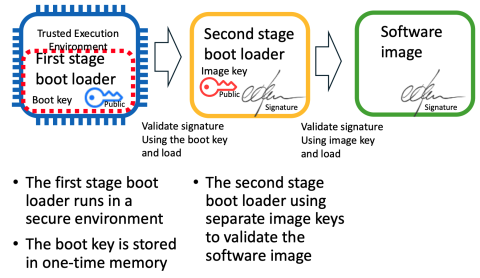
Figure 2: Example of a two-stage Secure bootloader
Image validation on an IoT device
IoT devices are often constrained devices with limited processing power and small memory capacity. Keys are often stored in specialised memory known as eFuses or One-time Programmable (OTP) memory. Once a key is written to OTP memory it cannot be changed and becomes a permanent part of the device. Public keys can be large, 4096 bits for example. To reduce the size of keys stored in this OTP memory, instead of saving the key, a cryptographical hash of the key is created. This hash, or fingerprint, is then stored in the OTP memory, see Figure 3.

Figure 3: Provision a key
These key fingerprints are then used in the image validation process. Before the image can be validated it must be signed. The image is signed using the manufacturer’s private boot key, then the signature added to the image. In addition, the public boot key is also added to the image, see Figure 4.
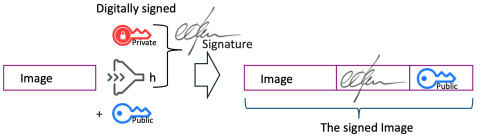
Figure 4: Signing the image
When the IoT device boots, it will validate the image using the fingerprint. First a hash of the public key is calculated, and compared to the fingerprint, if they are the same, the public key is valid. Second, a hash of the image is created, the image hash and the validated public key are used to validate the signature. If this validation succeeds the image is loaded and executed, see Figure 5.
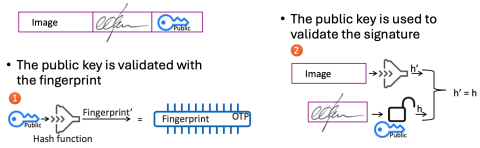
Figure 5: Validating the image
Image validation should ensure that only the entity in possession of the manufacturer’s private key can sign a valid image. This is where some of the issues may start. Best practice guidance recommends that the private key is stored in a Hardware Security Module (HSM) away from the development environment; images are then signed using the HSM. However, development organisations may not be using a HSM and there have been numerous instances of keys being leaked from development repositories, such as GitHub.
On-device key management
An IoT device may need to store multiple different types of keys, for example, boot key, identity key, encryption key, debug key. Some keys may also need a backup key or multiple different keys. All these keys may need to be provisioned, permissioned, and revoked.
How keys are configured in different IoT devices varies. Figure 5 is an example based on several current IoT devices. Each device may have a different OTP memory layout with varying types of protection. Each device may implement different features; for example, only allowing a key to be read by certain hardware peripherals or only being read if the processor is running in secure mode.
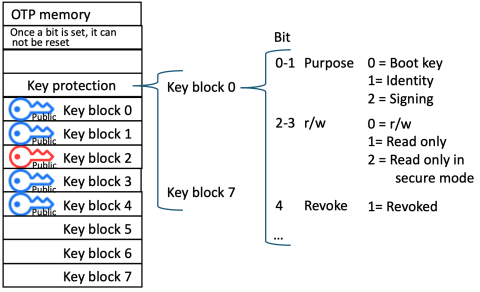
Figure 6: Example of key configuration in OTP memory
On-device key management is complex; it involves permanently setting configuration bits in the IoT device. Getting this configuration wrong can permanently damage the device. Figure 7 is an example of a real warning in an IoT device datasheet. Getting it wrong may also leave the device vulnerable, a malicious actor could add a key, change the role of a key or just revoke a valid boot key to brick the device.
Many IoT device manufacturers provide tools that allow developers to write data into OTP memory to reduce the number of misconfigurations. However, these tools are often a blackbox, with limited explanation of how they work. Developers must rely on the documentation alone and are likely to simply take the default option.

Figure 7: Example warning from a IOT device datasheet
Image validating is not the full story
Most IoT devices disable debug as part of enabling secure boot. If debug features are not disabled, it is possible to simply bypass the image validation completely, or to update the Flash or write to the OTP memory. If local updates via USB or other interfaces remain enabled, code can be added or updated after validation. This could allow an attacker with physical access to the IoT device to add malicious code.
Other security features may also need to be enabled, for example anti-rollback protection. This is a security feature that stops older versions of the firmware being loaded. If an older version of the software has a known vulnerability, an attacker can load the older version to attack the device. When anti-rollback protection is enabled, the IoT device will store the version number of the last image that was successfully loaded. An image with a lower number, even if correctly signed, will not be loaded.
Implications for developers
Secure boot acts as a catalyst, encouraging developers to consider additional security features such as key management and the activation of other necessary security protections. Our research focuses on how developers implement secure boot and the resulting impact on the development process. Secure boot is typically considered during the design phase, with its importance clearly recognised. However, testing poses challenges because debugging is disabled; any mistakes in configuration may lead to the device becoming permanently unusable. Testing often occurs late in the project or during pre-production.
Testing of secure boot also requires the verification of supporting features, such as whether a boot key can be revoked or updated. This testing should also include security considerations, for example, is there the potential for a malicious actor to add a new boot key or revoke a valid key?
Studies have found that developers often struggle to properly implement security features, such as securely storing hashed passwords, even when their attention is specifically directed toward security tasks. They take insecure answers when searching on dev forums. Setting up HTTPS for a website can be prone to mistakes, leaving sites vulnerable; automating this process helps minimise configuration errors. Developers are often expected to be security experts and fully grasp the security implications of the features they build.
Secure boot is a complex security feature that relies on multiple other configurations being properly set. It is difficult to test and usually gets evaluated late in the project cycle. As a result, keys are rarely revoked or updated, and misconfigurations can leave IoT devices vulnerable to attack. While large development organisations typically have the expertise and resources to implement secure boot correctly, smaller enterprises and startups may find it challenging.
Effective mechanisms are required to assist developers in testing on-device key management and secure boot without risking permanent device damage. Introducing open-source tools for configuring secure boot and on-device key management could standardise the process and ensure devices are appropriately configured for production.
More research is planned to evaluate how new tools may enhance the development process for secure boot. Individuals interested in supporting this research are encouraged to contact the author directly. By enabling developers to build more secure IoT devices with streamlined processes or advanced tools, it may be possible to mitigate vulnerabilities and safeguard end users.
About the Author
Andy Baldrian is a PhD researcher at the University of Bristol, specialising in developer-centred security. His work focuses on the development of IoT devices and explores how developers can be supported in creating more secure, privacy-preserving IoT solutions. With over thirty years of experience in the software industry, Andy has held a variety of roles including engineer, architect, manager, Vice President of Engineering, and Chief Technology Officer. This extensive background spans both large multinational software organisations and several small start-ups. Andy’s experience has led him to the view that senior managers within software companies must have a thorough understanding of the security challenges faced by both developers and users.


